Suka - Live Stream, Chat
- 0.0
- Rating
- 100.00K
- Installs
- Free
- Price

 Analysis by App-foxy
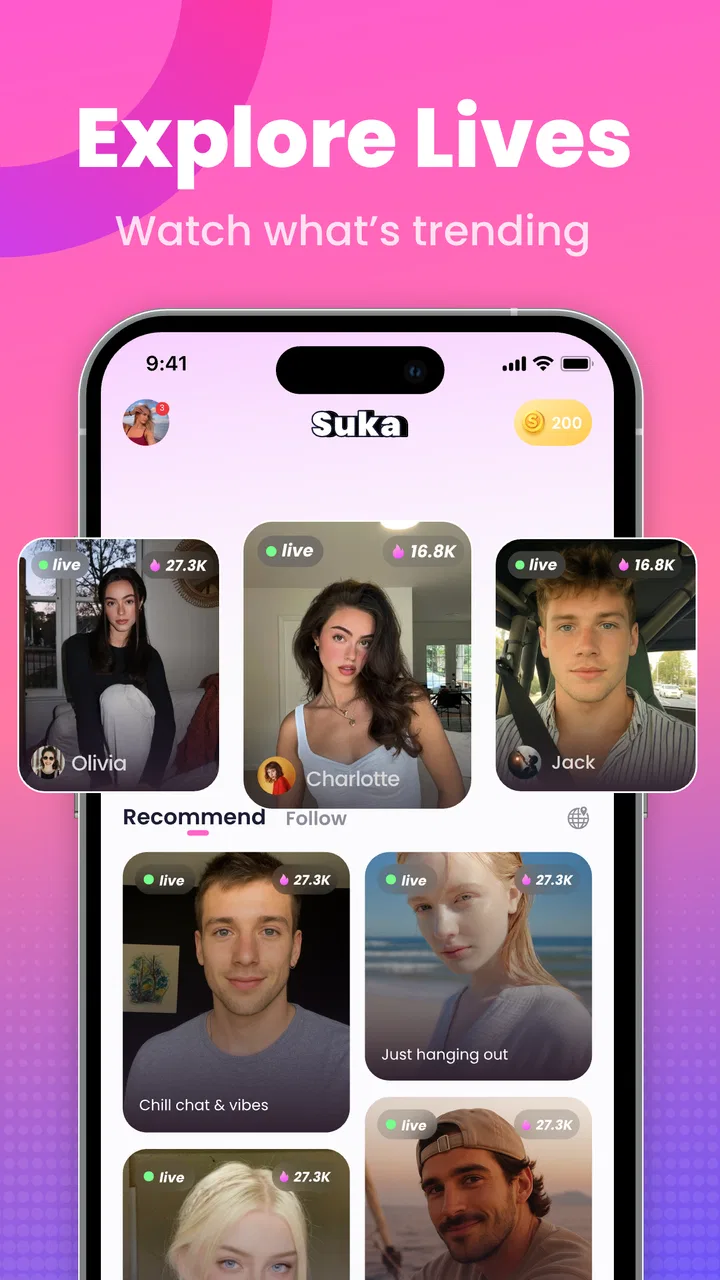
I approached Suka - Live Stream, Chat as a newcomer rather than assuming I already understood live-streaming apps. Its basic idea is easy to grasp: open a live environment, watch what is happening in real time, and look for conversations that feel more personal than a passive video feed. That makes it a lifestyle app with a social focus, but the experience depends heavily on how comfortable you are with spontaneous interaction.
My first impression is that Suka is aimed at people who want something less polished and predictable than ordinary social media. Recorded posts let you choose exactly what to see, while live content asks you to accept a little uncertainty. A host may be entertaining, quiet, busy with other viewers, or simply not the right match for your mood. The reward is the possibility of a genuine exchange rather than another carefully edited clip.
The app is free to install, although it includes optional purchases priced from under a dollar to amounts approaching a hundred dollars per item. That distinction matters. You can explore the service without treating it as a paid subscription from the start, but live social platforms often make it easy to spend in the moment. I would decide on a personal limit before browsing for a long time, especially if you enjoy supporting creators or sending virtual items.
You May Also Like

 Blood Strike: 2.5 Anniversary
Blood Strike’s Loadouts Turn Every Drop Into a Tactical Gamble
A close look at Blood Strike’s custom loadouts: how fast access to signature weapons reshapes its battle royale rhythm, rewards preparation, and narrows the gap between fights.

 Pandora - Music & Podcasts
Pandora’s Music Is Easy to Start, but Harder to Recover
Pandora’s strength is its low-effort path from a seed to a station. Its weak spot is how much confidence it asks you to place in connection, setup, and quiet recovery.

 8 Ball Pool
 Is Built on Rivalries, Rematches, and Routine
A close look at the rivalries, rematches, shared routines, and unanswered safety questions that turn a quick pool match into a persistent mobile community.

 Samsung Music
’s Quiet Strength Is Playing What You Already Own
Its reach comes less from spectacle than from dependable access to a personal library. That simplicity is both the app’s strongest retention engine and its ceiling.

 AccuWeather: Weather Radar
AccuWeather Review: A Quick, Clear Forecast for Everyday Decisions
For everyday plans, the best forecast is the one you can understand quickly. AccuWeather makes rain timing, radar, and local conditions easy to act on, with a few trade-offs.

 Hill Climb Racing
Why Hill Climb Racing Still Turns Crashes Into One More Run
A tiny car, a bumpy hill and one more upgrade: Hill Climb Racing keeps resurfacing because its simple chaos makes every near-miss feel personal.
More From Our News Desk
View All News


Getting comfortable with the live-streaming experience
The best way to understand Suka is to treat the first visit as an orientation session, not a race to become highly active. Browse for a while, notice which shows hold your attention, and pay attention to the difference between a stream that looks busy and one where the host actually responds to viewers. A crowded room can feel exciting, but a smaller conversation may be more useful if your goal is to make a connection.
The store summary presents the app around real-time shows and real connections, and that emphasis comes through in how I would use it. This is not the right place to expect every interaction to be equally meaningful. Real-time communication has natural pauses, uneven energy, and occasional awkwardness. Those are not necessarily defects, but they do mean that patience is part of the experience.
For a first-time user, the most important expectation is that success may be modest. A useful first session could simply mean finding one host whose topic interests you, writing a respectful message, and receiving a reply. You do not need to build a large audience immediately. In fact, focusing on one comfortable exchange is a better way to judge whether the app suits you than counting how many rooms you visit.
The mature audience label is also worth taking seriously. I would not recommend treating Suka as a general family-friendly space or handing it to a younger user casually. Adults should still use ordinary online judgment: avoid sharing private details too quickly, be careful with direct requests for money or personal contact, and leave conversations that make you uncomfortable. The live format can create a stronger sense of familiarity than the relationship really deserves.
What I would do immediately after installing
My first setup would be deliberately simple. I would open the app, examine the available live content, and avoid making purchases before understanding the basic rhythm of the service. If the app asks me to create or complete a profile, I would use only the information needed to participate comfortably. A short, genuine description is more useful than publishing details that could identify where I live or work.
I would also think about how I want to participate. There are at least three different user mindsets here: someone who mainly watches, someone who wants to chat, and someone interested in hosting or becoming more visible. These paths can overlap, but they do not feel the same. A viewer can remain quiet and sample different shows, while an active chatter needs to accept that messages may be missed. Someone hoping to host should be prepared to create energy without assuming an audience will appear instantly.
One practical tip is to choose a calm moment for the first session. Live apps are harder to evaluate while you are distracted, commuting, or trying to multitask. Give yourself enough attention to notice how quickly conversations move, whether you enjoy the tone of the rooms, and how easy it is to move on when a stream is not a good fit.
Another useful habit is to separate curiosity from commitment. You can be interested in a host or community without immediately moving the conversation elsewhere, spending money, or revealing personal information. That small pause helps preserve the fun of discovery while reducing the pressure that can come with fast-moving social interaction.
Finding a first meaningful interaction
For me, the clearest route to a successful first action would be to choose one live show and participate with a message that relates to what is happening on screen. A specific comment is more likely to start a conversation than a vague greeting. If the host is discussing a hobby, reacting to a performance, or answering questions, I would respond to that subject rather than trying to force attention toward myself.
It is also worth giving a room enough time to reveal its character. Jumping away after a few seconds can make every live show seem empty or unresponsive. At the same time, staying too long in a room that clearly does not suit you is not productive. I would use a simple test: does the host acknowledge viewers, does the conversation have a tone I enjoy, and would I feel comfortable writing a normal question here? If the answer is no across the board, I would move on without taking it personally.
A realistic everyday scenario might be an evening when I want company but do not want to arrange a full call with friends. I could open Suka, browse several live rooms, and settle into one where the conversation feels relaxed. I might write one relevant comment, receive a response, and continue for a few minutes. That is a small outcome, but it is exactly the kind of low-pressure social contact that can make the app worthwhile.
If you prefer watching silently, that is a valid starting point too. Observing how hosts handle questions can help you learn the local etiquette before speaking. I would look for whether viewers interrupt constantly, whether the host welcomes newcomers, and whether the room feels playful, serious, or flirtatious. This gives you context that a short store description cannot provide.
The trade-off is that live interaction has no guarantee of immediate payoff. Your message may be overlooked because the host is reading several comments at once. A quiet room may become active later, or it may remain quiet. I would judge the app over several intentional visits rather than one disappointing session.
Where new users may become confused
The word “live” can create the wrong expectation. It does not mean every person in the app is available for a private conversation or that every show is designed around direct attention. Some spaces may function more like performances, while others feel closer to casual group chat. Understanding that difference helps prevent frustration. I would enter a room first as a guest in an ongoing conversation, not as someone automatically entitled to a response.
Another possible source of confusion is the relationship between free access and optional spending. Because the app is free, a newcomer may assume every social action is cost-free, then encounter purchase prompts while exploring. I would slow down whenever a purchase appears and ask what I am actually receiving, whether it is necessary for the interaction I want, and whether I would still enjoy the app without buying anything.
That is especially important in a live setting, where emotion can be immediate. A host may be engaging, a room may feel exciting, and a purchase can seem like a quick way to participate. I would never treat spending as a test of friendship or as a requirement for being noticed. If the social experience depends on repeated purchases, that is a sign to step back and reconsider whether this is the right use of the app for me.
Privacy is another area where a first-time user should make deliberate choices. Live conversation can feel informal, but anything shared in a social environment can travel beyond the moment. I would avoid giving out my full name, home address, workplace details, financial information, or private contact details until I had built substantial trust outside the excitement of a stream. If someone pushes for those details quickly, I would regard that as a warning rather than a sign of closeness.
The mature rating does not remove the need for personal boundaries. It simply signals that the intended audience is adults. I would still expect the tone of rooms to vary, and I would leave immediately if content or conversation crosses my limits. A good social app should give me the freedom to choose my environment instead of making me tolerate an uncomfortable one.
How it compares with familiar alternatives
Compared with ordinary social networks, Suka places more weight on the present moment. A traditional feed is convenient when I want to browse at my own speed, revisit posts, or avoid being seen. Suka is more appealing when I want the possibility of a two-way exchange. The cost of that immediacy is less predictability: I cannot curate every detail of the experience before entering it.
Compared with messaging apps, the starting point is broader and more exploratory. In a normal chat app, I usually know who I am contacting and why. Here, discovery comes first, which can make meeting new people easier but also makes judgment more important. I would choose Suka for finding live social energy, not for replacing private conversations with people I already know.
Compared with recorded video platforms, the advantage is responsiveness. A live host can react to questions and create a shared moment. The disadvantage is that the quality is tied to timing, personality, and audience behavior. If I want polished tutorials, searchable information, or content I can pause and revisit, a recorded platform is usually the better tool.
There is also a difference from purely anonymous chat services. A live show gives more context than a blank text room because I can see the host’s presentation and observe the atmosphere. However, visual context should not be mistaken for proof of identity or trustworthiness. I would still keep the same boundaries I use anywhere else online.
Who will get the most from Suka
I think Suka is best for adults who enjoy discovering personalities in real time and do not need every interaction to be perfectly efficient. It may suit someone who wants casual company after work, a viewer who likes supporting live creators, or a social user who finds recorded feeds too passive. It can also appeal to people who prefer starting conversations around a shared live moment instead of sending an unexpected private message.
The app is less suitable for someone who wants a quiet, tightly controlled experience. If you dislike unpredictable conversations, do not want to encounter mature social content, or feel uncomfortable with optional purchases appearing during exploration, the usual feed-based alternatives may be a better match. It is also not ideal if your main goal is structured learning, professional networking, or dependable communication with existing contacts.
I would be cautious about installing it for a child or younger teenager. The adult rating makes that a poor fit, regardless of how harmless an individual room may seem. Adults who are new to live social apps should also start slowly, because the combination of real-time attention and spending options can feel more intense than ordinary browsing.
Performance expectations and practical trade-offs
The current release is version 1.1.4, and it supports devices running Android 7.0 or later. That makes it accessible to many older Android users, but compatibility alone does not guarantee an equally smooth experience on every device. Live video and chat are more demanding than reading a static feed, so I would keep the app updated and make sure my phone has enough free space and a stable connection before judging it.
Live content can also be more sensitive to interruptions than recorded media. If a connection becomes unstable, the conversation may lose its rhythm, and returning to the same moment may not be possible. I would avoid starting an important conversation when I know my connection is unreliable. For casual browsing, that limitation is manageable; for a serious or time-sensitive exchange, a conventional call or messaging app may be safer.
The developer is M Yasin, and the app has passed the threshold of over a hundred thousand installs. I see that reach as a sign that the concept has attracted a meaningful audience, but not as a promise that every room will feel active at every hour. The usefulness of a live community depends on who is present when I open the app, so my experience may vary considerably from one visit to the next.
I would also keep the purchase range in mind: individual in-app items run from $0.99 up to $99.99. That broad range makes it especially important to distinguish casual participation from paid support. If I decide to spend, I would do it because I have consciously chosen to support an experience I value, not because the conversation made me feel rushed or obligated.
A sensible routine after the first visit
After finding a room I enjoy, I would return at different times rather than assuming one good session represents the entire app. I would notice whether the appeal comes from the host, the audience, the subject, or simply the mood of that particular moment. This helps me decide whether to follow a consistent interest or keep Suka as an occasional way to browse live content.
I would also build a personal rule for engagement. For example, I might spend my first few visits watching and commenting without buying anything. Later, if I still enjoy the community and understand the purchase system, I could decide whether optional support makes sense. This approach keeps the app’s social value separate from its monetization.
When a conversation becomes more personal, I would slow down rather than assuming the connection must continue elsewhere. A strong interaction can remain enjoyable inside the app. If I eventually choose to communicate through another service, I would make that decision based on trust and comfort, not on pressure from a host or another viewer.
One less obvious benefit of this slower approach is that it makes it easier to identify the type of interaction I actually want. I may think I want constant chat, then discover that I prefer watching a relaxed show. Or I may find that a small, responsive room is much better for me than a highly active one. Suka works best when I use it according to that preference instead of copying how the most visible users behave.
My recommendation after using it as a newcomer
Suka - Live Stream, Chat has a clear appeal: it offers a direct route into live social spaces where the next conversation is not fully scripted. I like that it can provide a low-pressure way to find company, especially when I want interaction without arranging a formal call. The strongest moments come from choosing the right room, contributing naturally, and accepting that not every visit will produce a memorable exchange.
Its limitations are just as important. The live format can be uneven, mature content requires adult judgment, and optional purchases deserve careful control. The app is not a replacement for a reliable messaging tool, a polished video library, or a private conversation with someone I already trust. It is a discovery-oriented social experience, and that means uncertainty is part of the package.
My advice to a first-time user is straightforward: install it for free, browse patiently, choose one room that genuinely interests you, and try one relevant message before deciding how active you want to be. Keep personal details private, ignore pressure to spend, and leave any room that feels wrong. If the possibility of spontaneous conversation sounds more appealing than a perfectly curated feed, Suka is worth exploring as an adult lifestyle app. If you prefer control, privacy, and predictable content, a conventional alternative will probably serve you better.
FAQs for Suka - Live Stream, Chat
01What is Suka - Live Stream, Chat, and what can I do with it?
Suka - Live Stream, Chat is a social entertainment app focused on live video broadcasts and real-time interaction. After creating a profile, users can browse live rooms, watch hosts, send messages, react to broadcasts, and potentially start their own streams, depending on account eligibility and app permissions. It is designed for meeting people and chatting rather than private messaging alone.
02Is Suka - Live Stream, Chat free to download and use?
The app can generally be downloaded without an upfront purchase, but some features may involve optional in-app purchases. Live-stream platforms commonly offer virtual gifts, coins, premium interactions, or other paid items that enhance communication with hosts. Before spending money, check the current pricing, payment settings, refund rules, and whether recurring subscriptions are enabled through your Google Play or App Store account.
03Is Suka - Live Stream, Chat safe for children and teenagers?
Parents should review the app’s current age rating and privacy information before allowing a child or teenager to use it. Live chat can expose users to strangers, mature conversations, unwanted messages, or requests for personal information. Use privacy controls, avoid sharing a phone number or location, block suspicious accounts, report inappropriate behavior, and supervise younger users whenever possible.
04What permissions and account information does Suka - Live Stream, Chat require?
The exact requirements can vary by device and app version, but a live-streaming service may request access to the camera, microphone, notifications, photos, or network connection. These permissions support broadcasting, profile customization, and alerts. Review each request carefully and deny access that is not needed. Also check the privacy policy to understand how profile, chat, and streaming data may be handled.
05What should I do if I experience inappropriate content, harassment, or technical problems?
If you encounter offensive content, scams, harassment, or suspicious requests, do not continue the conversation or share personal details. Use the in-app report and block tools, save relevant evidence when appropriate, and contact the platform’s support team. For technical issues, update the app, check your internet connection, restart it, and verify that camera and microphone permissions are enabled.
Pros
- Easy to discover live streams by category and creator.
- Real-time chat makes broadcasts feel interactive and social.
- Users can follow favorite hosts and receive activity updates.
- Supports casual entertainment without requiring long viewing sessions.
- Live content offers a more personal feel than prerecorded videos.
Cons
- Stream quality can vary depending on the host’s connection.
- Busy chats may make it difficult to follow individual messages.
- Some creators or features may encourage in-app spending.
- Public live interactions may require careful privacy management.
- Content availability can differ significantly by region and time.

Suka - Live Stream, Chat
Gallery